Planning Cleaners Door codes Handover FAQ Book a demo Log in Eesti keeles

Cleaning & turnover software for short-term rentalsFrom booking to clean. Automatically.

For vacation rental hosts, property managers and cleaning companies. Reeno turns every Airbnb and Booking.com booking into a scheduled cleaning, gives guests and cleaners door codes that never overlap, and tells the cleaner the moment the guest has left.

AirbnbBooking.comiCalSmart locksHome Assistant
app.reeno.io
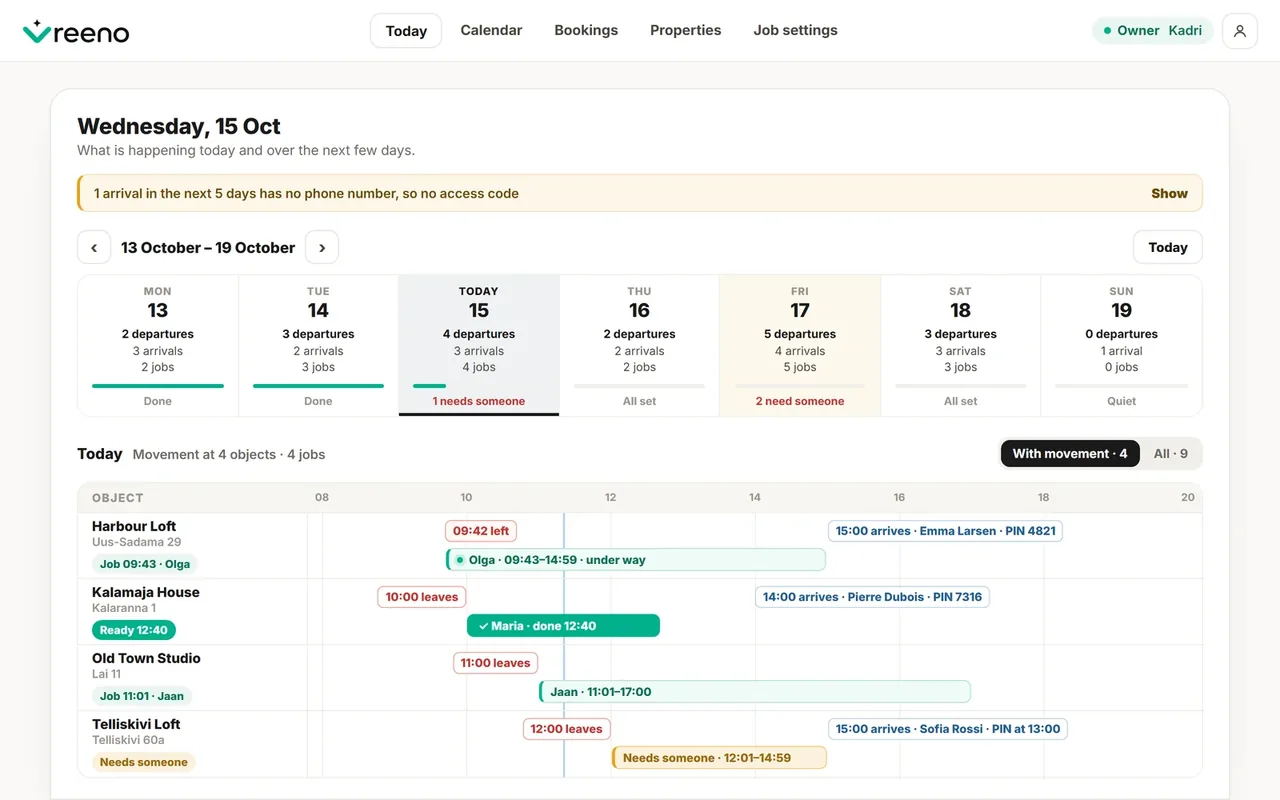
Reeno's Today page for an owner: the week's departures, arrivals and cleanings, and today's timeline with cleaners, door codes and a cleaning still needing someone.
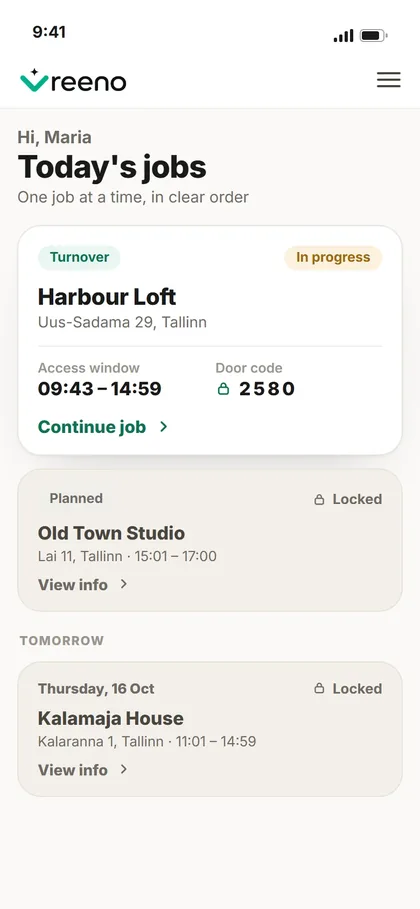
A cleaner's phone: today's job with its access window and door code, the next jobs locked until their turn.
Planning

Every check-out becomes a cleaning job, with the right window.

Reeno reads Airbnb, Booking.com and any iCal calendar, adds your direct bookings and owner stays, and schedules each turnover between one guest's check-out and the next one's check-in. The cleaning schedule builds itself — the owner and the housekeeping manager see the same day.

Window

Timed from the next arrival

A turnover starts a minute after check-out and ends a minute before the next check-in. Days that are too tight are flagged before they happen.

Your call

Times set by hand hold

Move a cleaning to another day, start it at a fixed hour, give it more time. The calendar sync never quietly drags it back.

Watching

Gaps and clashes surface

A cleaning nobody has taken, an arrival without a door code, two guests booked onto the same nights — shown on Today, not discovered at the door.

Cleaners

Everything the job needs, on the cleaner's phone.

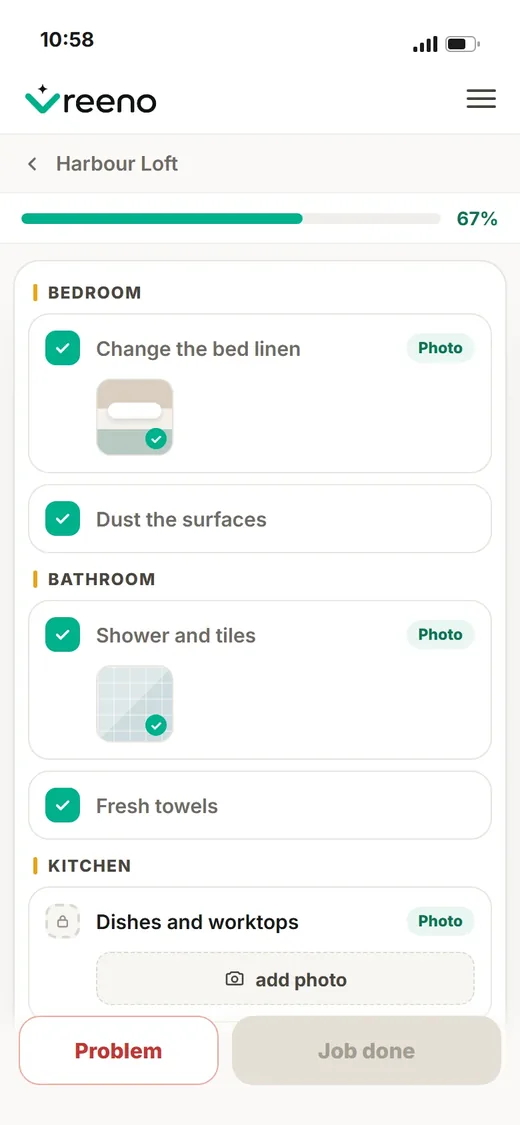
Today's jobs in order, each with its access window and door code, a checklist room by room and the photos that prove it. No app store — a link that installs to the home screen.
  • One job at a timeThe next one stays locked until its window opens.
  • Photo proof where it mattersYou choose which items need a photo; the job can't be closed without them.
  • Problems reported on the spotDamage, a fault or a missing item, with a photo — kept with the job for the owner and manager.
Today's jobs on a cleaner's phone: Harbour Loft in progress with access window 09:43–14:59 and door code; Old Town Studio locked until 15:01.
The checklist on a cleaner's phone: bedroom, bathroom and kitchen items, two with photos added, the kitchen still waiting for its photo.
Door codes

Codes for guests and cleaners that never overlap.

Every guest gets a code — the last digits of their phone, one Reeno generates, or one you type. The cleaner's code switches on for the cleaning and off before the next guest's begins — two codes never work at once.
  • Straight to the lockCodes go to a connected smart lock, or to Home Assistant for the lock you already have.
  • Kept clear of every guestAn early check-in or a late check-out moves the cleaner's code, not the guest's.
  • Nothing forgottenArrivals without a code show up days ahead, and Reeno reminds you to send the check-in info.
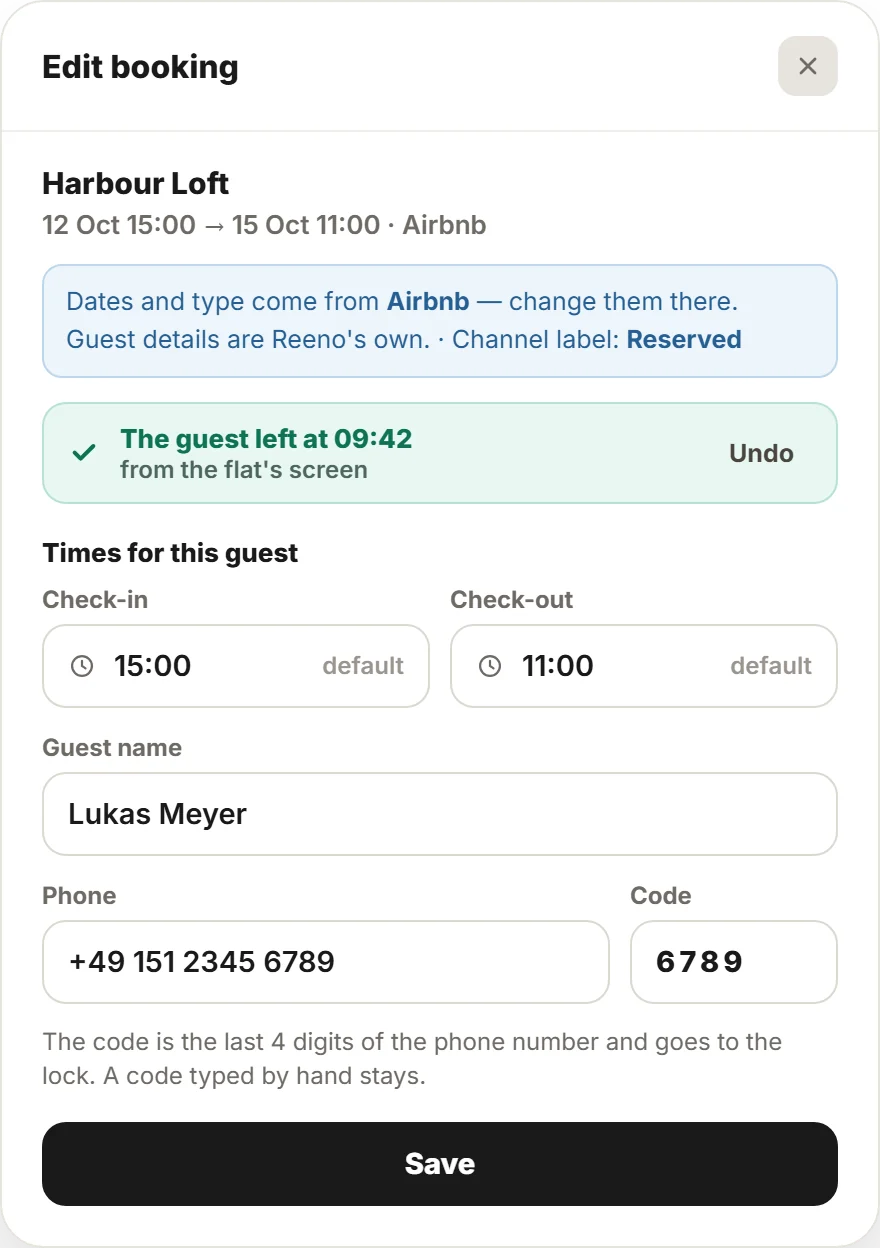
A booking in Reeno: an Airbnb stay at Harbour Loft, the guest left at 09:42 from the flat's screen, and the door code taken from the guest's phone number.
Handover

The guest leaves. The cleaner knows. The door opens.

A tablet by the door lets the guest say they have left. Reeno tells the cleaner at once, opens the job early and moves the door codes — so the flat is ready sooner, and nobody waits outside.
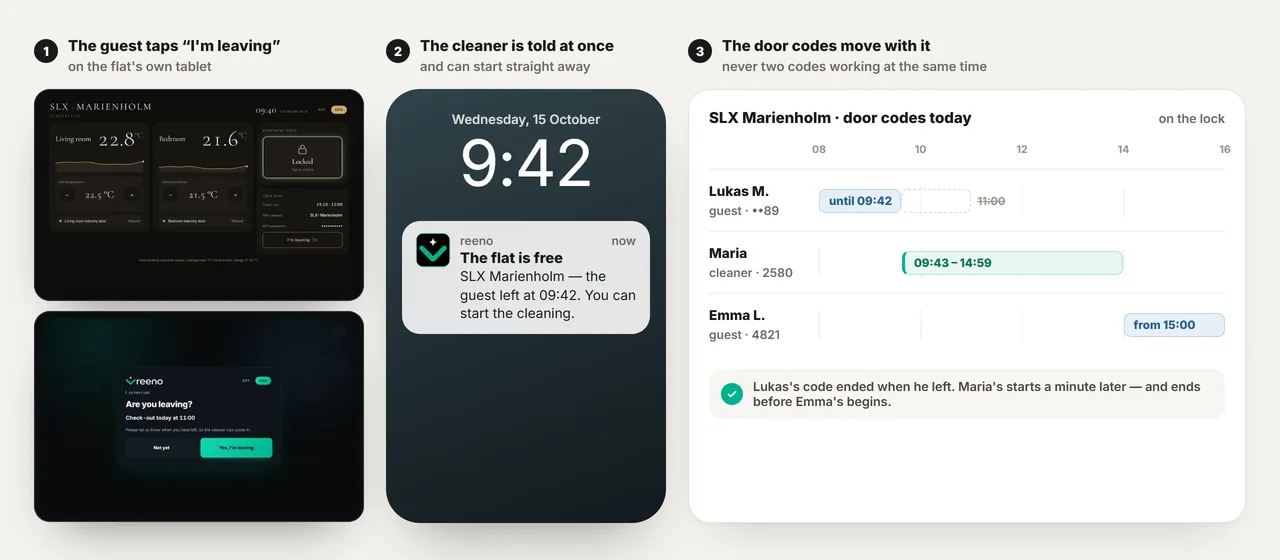
Three steps: the guest taps “I'm leaving” on the flat's tablet; the cleaner's phone shows “The flat is free”; the door codes move — the guest's code ends at 09:42, the cleaner's runs 09:43–14:59, the next guest's starts at 15:00.

Swipe to see all three steps →

Tablet screens from SLX Marienholm in Haapsalu, running Home Assistant. Without a tablet, the owner or manager marks the departure in Reeno and the same happens.
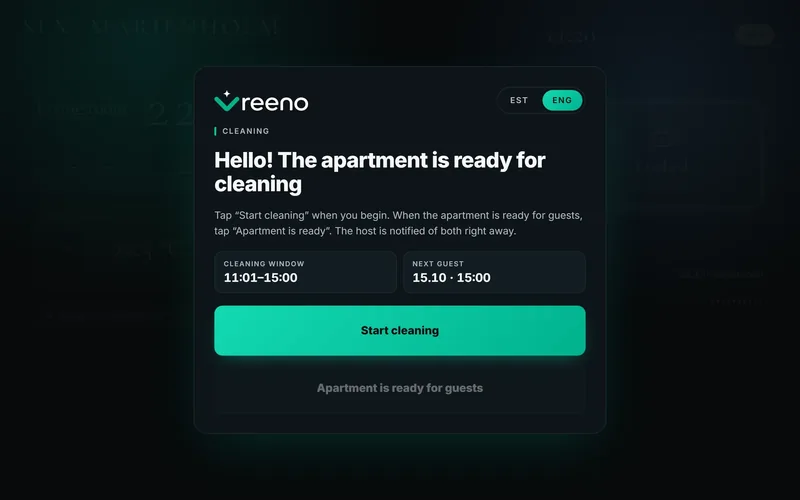
The flat's tablet greets the cleaner: the cleaning window 11:01–15:00, the next guest at 15:00, and a Start cleaning button.
The cleaner starts on the tabletThe cleaning window, the next guest's arrival and one button. Reeno marks the job in progress.
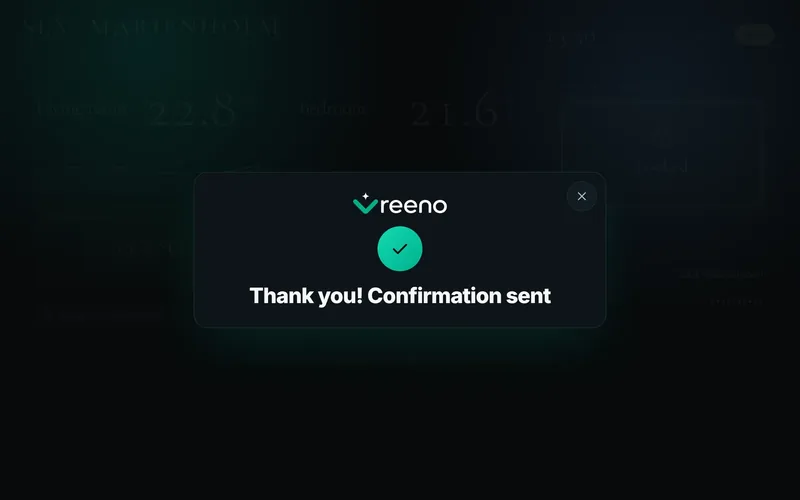
The tablet after the cleaner tapped Apartment is ready: Thank you, confirmation sent.
…and says when the flat is readyOne tap closes the job in Reeno. A job with a checklist or required photos is finished in the app instead.
For the whole team

One operation. A screen for each role.

Hosts and property managers, cleaning companies and cleaners work from the same live information — each sees what they need, and nothing they don't.

Owner

The day at a glance

Every property's departures, arrivals, cleanings and codes on one Today page.

  • Bookings from every channel in one calendar
  • Door codes and check-in reminders
  • A cleaning company connected per property
  • Results with photos and problems
Manager

Run the cleaning operation

Plan the team's day, cover the gaps and see what actually happened.

  • Day planner and workload
  • Unassigned and late jobs
  • Cleaner groups and working hours
  • History and actual durations
Cleaner

Just the work

A focused phone view with today's jobs and everything needed to do them.

  • Jobs in order, with access details
  • Room-by-room checklists
  • Photos and problem reports
  • “The flat is free” notifications
Connects with

Works with the tools you already run.

AirbnbReservations imported by calendar link, with the guest's phone digits for the door code.
Booking.comReservations imported by calendar link.
Any iCal calendarOther channels, a combined calendar or your own — one more link.
Smart locksCodes for guests and cleaners set and removed automatically.
Home AssistantDeparture button, cleaning buttons, occupancy and door codes in your own automations.
Your calendar appBookings and cleanings in Google or Apple Calendar; Apple Calendar can also remind you before each arrival.
FAQ

What teams usually ask first.

Who is Reeno for?

Hosts and property managers with short-term or vacation rentals — from a single apartment to a portfolio — and the cleaning companies that turn them over. It suits anyone who still plans cleanings from a channel calendar and a group chat.

Does Reeno work with Airbnb and Booking.com?

Yes. Reeno imports bookings from Airbnb, Booking.com and other iCal calendars, and turns each check-out into a cleaning job with its own window.

Do we need to move all bookings into Reeno?

No. Reeno works from the calendars you already have. Direct bookings and owner stays can be added in Reeno when you need them.

Which locks work with Reeno?

Reeno sets codes on a connected smart lock directly, and hands every code to Home Assistant, where your own automation can set it on the lock you already have. Ask us about yours.

Does the cleaner need a computer or an app?

No. Cleaners work from their phone — they open a link and can add Reeno to the home screen so it opens like any other app. Nothing to download, no app store.

Are photos always mandatory?

No. You decide which checklist items are for information, which need a tick and which need a photo.

Can a cleaning company use Reeno without managing bookings?

Yes. A cleaning company works with the jobs on the properties it serves; the owner keeps the bookings and decides what the company may see.

Which languages does Reeno speak?

English and Estonian, in the app and on the cleaner's phone. Reeno is built in Estonia and works wherever your rentals are.

Make every turnover run itself.

See Reeno with your own properties — bookings, cleanings and door codes connected in one place.

or write to hello@reeno.io